
31 Sims 4 CC Finds You Need in Your Game Right Now
Affiliate Disclosure
This post contains affiliate links. Pixels and Bloom may earn a commission when you purchase through these links, at no additional cost to you. All opinions are our own and we only recommend products we believe will genuinely benefit our readers.
Your Base Game Is Holding Your Sims Back – Here’s What to Do About It.
You’ve spent an hour in Create-a-Sim. You’ve tried every hair. Cycled through every outfit. Rotated through the same limited skin tones, the same slightly-stiff clothing shapes, the same three hairstyles that look good on anyone.
And your Sim still looks… fine. But not exactly yours.
Then you see a screenshot on TikTok, a Sim with a perfect curtain-bang bob, wearing an oversized linen blazer over lace-edged socks, with a skin overlay that actually looks like light is hitting a real face, and then you think: how?
The answer is custom content (CC) and if you’ve been playing Sims 4 without it, you have no idea what you’re missing.
CC doesn’t just improve your Sims’ appearance. The right build and furniture CC transforms your homes from EA-catalog-generic into spaces that look individually designed. The right clutter CC adds the small human details that make a room feel actually inhabited. The right gameplay CC adds systems and storytelling depth that EA has never gotten around to building.
This post covers 31 Sims 4 CC finds you need in your game – across CAS, build and buy, clutter, and gameplay, organized by category with guidance on where to find each one, what makes it exceptional, and how to install it safely.
What’s inside:
- The difference between Maxis Match and Alpha CC and which one is right for your game.
- How to install CC safely (step-by-step) without risking your saves.
- 31 specific CC finds organized by CAS, build/buy, clutter, and gameplay-adjacent.
- The best CC creators to follow in 2026 – the ones whose Patreons and Tumblrs are worth your time
- A trusted source guide so you never download from a sketchy site again
- A complete FAQ covering every CC beginner question
Let’s build your CC folder.
Maxis Match vs Alpha: Understanding the Two Worlds of Sims 4 CC

Image Credit: @Wambels
Before you download a single file, you need to understand the most fundamental divide in the Sims 4 CC community.
Maxis Match (MM) CC is designed to blend seamlessly with EA’s art style, the slightly stylized, clay-smooth, bright-and-colourful look the game ships with. Maxis Match hair looks like it belongs in EA’s own content. MM furniture matches the visual language of base-game items. If you want your CC to feel like it was always part of the game, Maxis Match is your world.
Alpha CC prioritizes realism over game-consistency. Alpha hair features individual strands visible in high resolution, more physically accurate textures, and a much more photo-realistic quality. Alpha clothing often uses real fabric textures rather than painted-on detail. Alpha Sims look stunning in screenshots but can feel visually jarring next to base game Sims and furniture in regular gameplay.
Most experienced players fall into one of two camps or adopt a hybrid “Maxis Mix” approach, using Maxis Match for build and buy items (so homes look cohesive) while using some Alpha elements for their main played household’s CAS items (where the screenshot quality matters more).
| Maxis Match | Alpha | |
|---|---|---|
| Visual feel | Cohesive with base game | Realistic, high-detail |
| Best for | Build/buy, everyday gameplay | CAS, screenshots, storytelling |
| File size | Generally lighter | Can be large (many polygons) |
| Game performance | Less impact | Can slow heavily CC-loaded games |
| Top creators | Felixandre, HeyHarrie, Pierisim | Sentate, Nightcrawler, Stealthic |
How to Install Sims 4 CC Safely: Step-by-Step
Installing CC is genuinely simple once you know the steps. Here’s the complete process:
Step 1: Enable CC in Game Settings
Before CC will appear in your game, you need to enable it:
- Open The Sims 4
- Go to Game Options → Other
- Check “Enable Custom Content and Mods”
- Check “Script Mods Allowed” (required for gameplay mods)
- Click Apply Changes and restart the game
Important: After every major EA patch, the game often disables mods automatically. Check these settings after each update.
Step 2: Find Your Mods Folder
The Mods folder is where all CC files must live:
- PC:
Documents > Electronic Arts > The Sims 4 > Mods - Mac:
Documents > Electronic Arts > The Sims 4 > Mods
If the Mods folder doesn’t exist, create one. The game will recognize it automatically.
Step 3: Download from Trusted Sources Only
The safest CC download sources are:
| Source | Best For | Link |
|---|---|---|
| CurseForge | All types – largest, most organized repository | curseforge.com/sims4 |
| The Sims Resource (TSR) | Furniture, clothing, build items | thesimsresource.com |
| ModTheSims | Gameplay mods and diverse CC | modthesims.info |
| Creator Patreons | Early access and full collections | patreon.com |
| Creator Tumblrs | Niche finds, direct creator links | tumblr.com |
| SimFileShare / Google Drive | Hosting for Tumblr-linked downloads | — |
Always avoid: Sites with excessive pop-ups, any download that includes a .exe file, reuploaded content with no creator credit, and torrent-based CC collections.
Step 4: Extract and Place Files
Most CC downloads come in .zip or .rar compressed formats. Use WinRAR or 7-Zip (Windows) or The Unarchiver (Mac) to extract them.
The files inside will be one of these types:
.package– clothing, hair, furniture, build items → goes in your Mods folder.ts4script– gameplay mods → goes in the main Mods folder (not a subfolder).trayitem/.sgi/.householdbinary– Sims and lots → goes in the Tray folder, not Mods
Organization tip: Create subfolders within Mods (e.g., Mods > CAS > Hair, Mods > Build > Furniture) but keep folders to maximum one level deep, the game can’t read files nested more than five folders deep.
Step 5: Test In Game
Launch the game, go to Create-a-Sim or Build Mode, and check that your new CC appears. Items with a diamond icon badge are CC. If items aren’t showing up, check that the files are in the correct folder and that CC is still enabled in settings.
Quick Reference: 31 CC Finds at a Glance
| # | CC Find | Category | Style | Source |
|---|---|---|---|---|
| 1 | Harlie’s Windows & Doors Pack | Build | MM | HeyHarrie (Tumblr/Patreon) |
| 2 | The Kitchen by Felixandre + HeyHarrie | Build/Buy | MM | HeyHarrie Patreon (free) |
| 3 | The Bafroom by Felixandre + HeyHarrie | Build/Buy | MM | HeyHarrie Patreon (free) |
| 4 | Peacemaker’s Living Room Sets | Build/Buy | MM | Patreon (free public) |
| 5 | Pierisim Unfold Set | Build/Buy | MM | CurseForge / TSR |
| 6 | Illogicalsims Minimalist Bedroom | Build/Buy | MM | TSR / Patreon |
| 7 | Around the Sims 4 Kitchen Clutter | Clutter | MM | aroundthesims.com |
| 8 | Clutter Cat Decor Sets | Clutter | MM | Tumblr |
| 9 | Sixam CC Home Improvement Pack | Build/Clutter | MM | sixam.cc (free) |
| 10 | Plumbob Tea Society Cottage Garden | Build/Buy | MM | TSR (free) |
| 11 | Harlie Maxis Match Rugs | Build/Buy | MM | HeyHarrie (Tumblr/Patreon) |
| 12 | Debug Item Cheat (bb.showhiddenobjects) | Build hack | MM | In-game |
| 13 | Aharris00britney Hair Collection | CAS – Hair | MM | TSR / Patreon |
| 14 | Okruee Hair CC | CAS – Hair | MM | CurseForge / Patreon |
| 15 | Greenllamas Hair with Ombre Accessory | CAS – Hair | MM | TSR |
| 16 | Dogsill Hair Collection | CAS – Hair | MM | Patreon (free public) |
| 17 | Stealthic Alpha Hairs | CAS – Hair | Alpha | TSR / stealthic.net |
| 18 | Nightcrawler Alpha Hairs | CAS – Hair | Alpha | TSR |
| 19 | Ebonix Black Hair CC | CAS – Hair | MM/Alpha | ebonixsims.com |
| 20 | PralineSims Skin Overlay | CAS – Skin | MM blend | praline.tumblr.com |
| 21 | Peachyfaerie Skin Details (stretch marks, rosacea) | CAS – Skin | MM | Patreon |
| 22 | Sentate Workwear Collection | CAS – Clothing | Alpha | TSR / Patreon |
| 23 | Belaloallure Trendy CAS Sets | CAS – Clothing | Alpha | TSR / Patreon |
| 24 | DarkNighTt Athleisure & Streetwear | CAS – Clothing | Alpha | TSR / Tumblr |
| 25 | Jius-Sims Shoe Collections | CAS – Shoes | Alpha | TSR / jius-sims Tumblr |
| 26 | Charly Pancakes Doors & Windows | Build | MM | charlyccfinds.tumblr.com |
| 27 | Simkoos Influencer Clutter Pack | Clutter | MM | TSR |
| 28 | Mel Bennett Clutter Sets | Clutter | MM | TSR / Patreon |
| 29 | Plumbob Tea Society Stellar Stuff Pack | Build/CAS | MM | TSR (free) |
| 30 | Sixam CC Home Office / Small Spaces | Build/Buy | MM | sixam.cc (free) |
| 31 | Plumbob Tea Society Tiny Travellers | Build/Buy | MM | TSR (free) |
The 31 CC Finds in Full
Build & Buy CC (The Pieces That Transform Your Homes)
1. HeyHarrie’s Windows & Doors Pack
Why you need it: EA’s base-game doors and windows are functional but dated. HeyHarrie’s windows and doors consistently top community “most essential build CC” lists for good reason, they are architectural-quality pieces in wood tones that are meticulously matched across the entire collection.
What makes it exceptional: The warm wood tones are consistent across every piece, meaning windows, doors, and frames all work together as a unified system. This is rare in CC, most creators don’t think about cross-item material consistency. HeyHarrie does, and it shows.
Style: Maxis Match, modern with a warm organic quality, works in farmhouse, Japandi, Scandinavian, and contemporary builds.
Where to find: HeyHarrie’s Tumblr and Patreon (most content free after a short early access period). Search heyharrie on CurseForge.
Pro Tip: Download the full HeyHarrie window collection before your next build session and replace every EA window in your current build with HeyHarrie equivalents. The visual upgrade is immediate and dramatic.
2. The Kitchen – Felixandre + HeyHarrie (House of Harlix)
Why you need it: This is widely considered the finest Maxis Match kitchen CC collection ever released for The Sims 4, with 56 items including appliances, counters, plants, and kitchen accessories. The House of Harlix collaboration between Felixandre and HeyHarrie raises the bar for what community-made content can achieve.
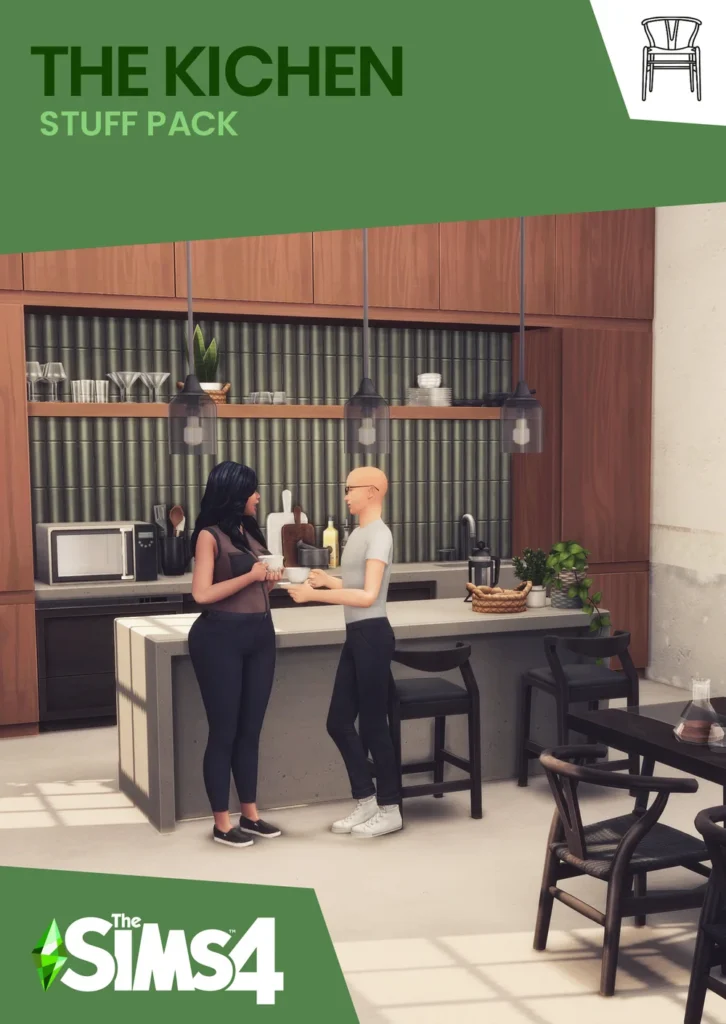
What makes it exceptional: 64 counter swatch options. New meshes and Maxis mesh edits. Complete kitchen functionality from appliances to the smallest decorative item. Completely free.
Style: Contemporary with warm organic touches, fits modern farmhouse, Scandinavian, contemporary, and transitional builds.
Where to find: HeyHarrie’s Patreon (free public tier).
3. The Bafroom – Felixandre + HeyHarrie (House of Harlix)
Why you need it: The bathroom partner to The Kitchen. 94 pieces including tiles, fixtures, mirrors, storage, and a wide range of decorative items. The scale and quality of this pack makes it the single most impactful bathroom CC download available.
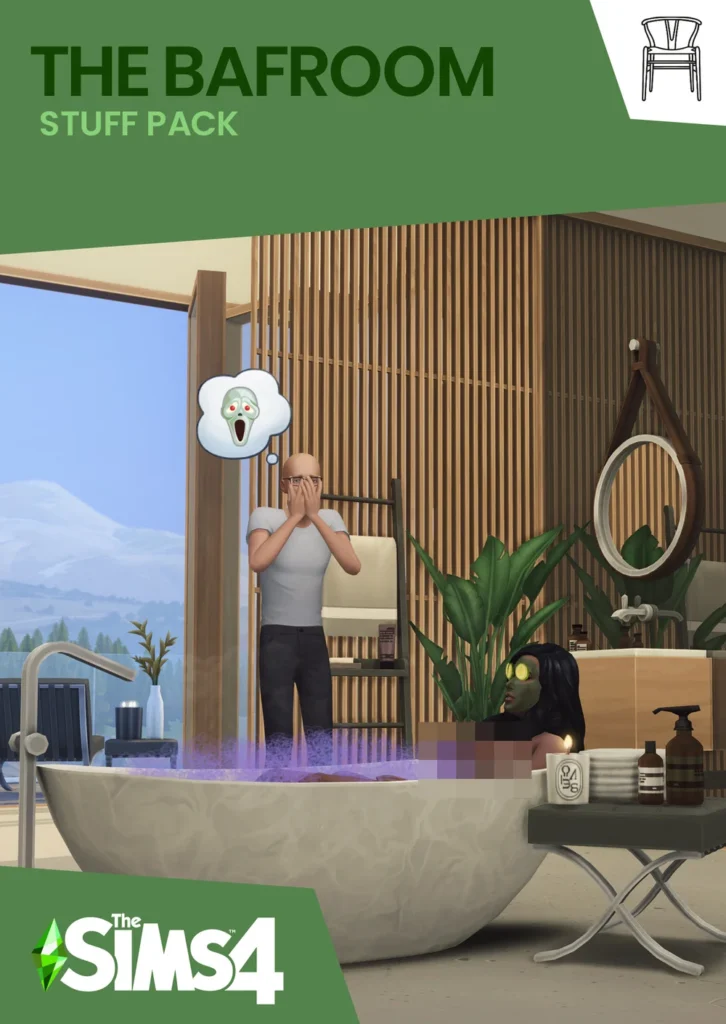
What makes it exceptional: Sheer scale (94 pieces), perfect material matching between items, functional fixtures alongside decorative ones, and genuinely photogenic results in screenshots.
Where to find: HeyHarrie’s Patreon (free public tier).
4. Peacemaker’s Living Room & Furniture Sets
Why you need it: Peacemaker has been one of the most beloved Sims 4 build CC creators for years. Where most contemporary CC leans modern and minimal, Peacemaker specializes in cosy, warm, non-modern styles – farmhouse, cottage, rustic-contemporary, that the broader CC landscape underserves.
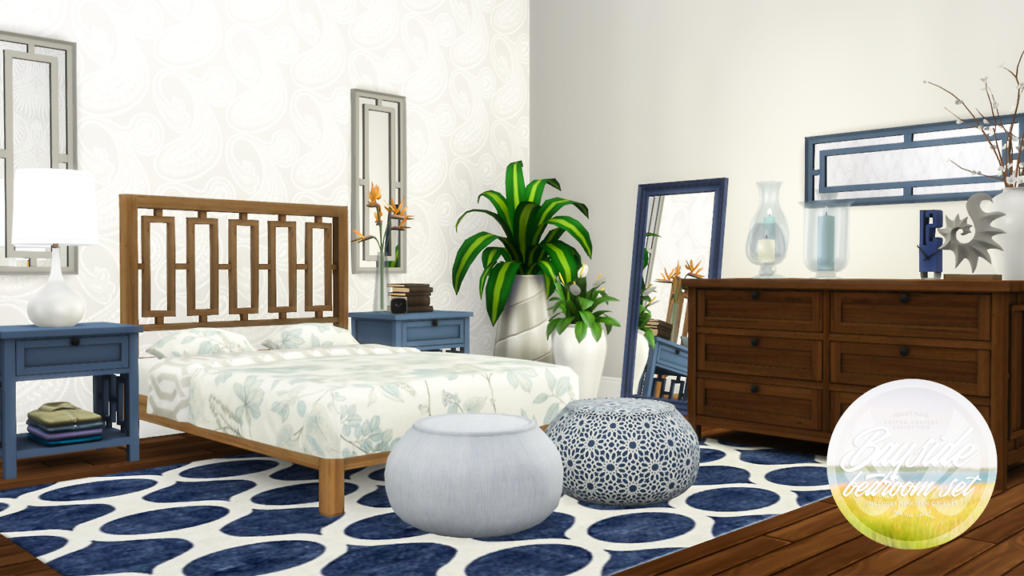
What makes it exceptional: Multi-swatch variety, high consistency across sets, and a genuine warmth that makes builds feel lived-in rather than showroom-staged. Peacemaker’s sets consistently come with multiple furniture pieces that form a complete, coordinated room.
Style: Warm contemporary, farmhouse, cottage, eclectic.
Where to find: Peacemaker’s Patreon (most content free after early access period). Search peacemaker_ic on CurseForge.
5. Pierisim’s Unfold Set
Why you need it: Pierisim is one of the most technically skilled Maxis Match creators operating today. The Unfold Set specifically introduced foldable/convertible furniture, fold-down beds, foldable tables, that are perfect for tiny homes, studio apartments, and small-space builds.
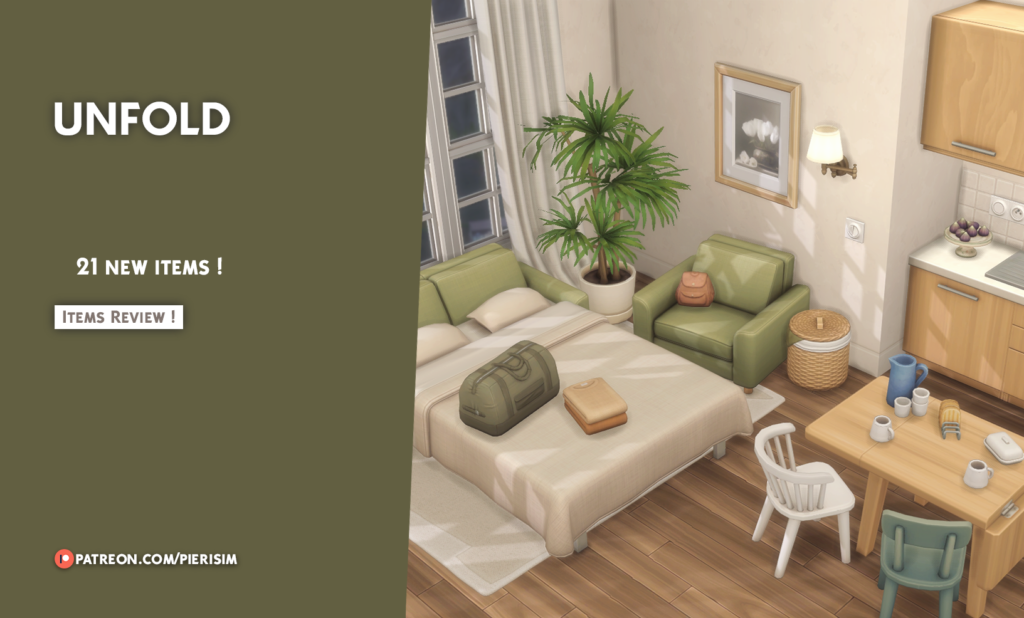
What makes it exceptional: The functional animation on convertible furniture is smooth and realistic. The entire set uses deco slots effectively, meaning you can place clutter on surfaces without needing bb.moveobjects. Every item in the set is search-tagged in-game with the creator name for easy finding.
Where to find: CurseForge and TSR. Search Pierisim in-game after installing.
Pro Tip: Search for
Pierisimin the in-game Build Mode search bar to find all installed Pierisim items at once — a trick that works with any CC creator who tags their work with their name.
6. Illogicalsims Minimalist Bedroom, Contemporary Living & Sleek Kitchen
Why you need it: If your aesthetic runs toward clean modern design, monochromatic rooms, geometric furniture, flat surfaces and no ornament – illogicalsims is your essential creator. These three packs (Minimalist Bedroom, Contemporary Living, and Sleek Kitchen) work as a unified visual system.
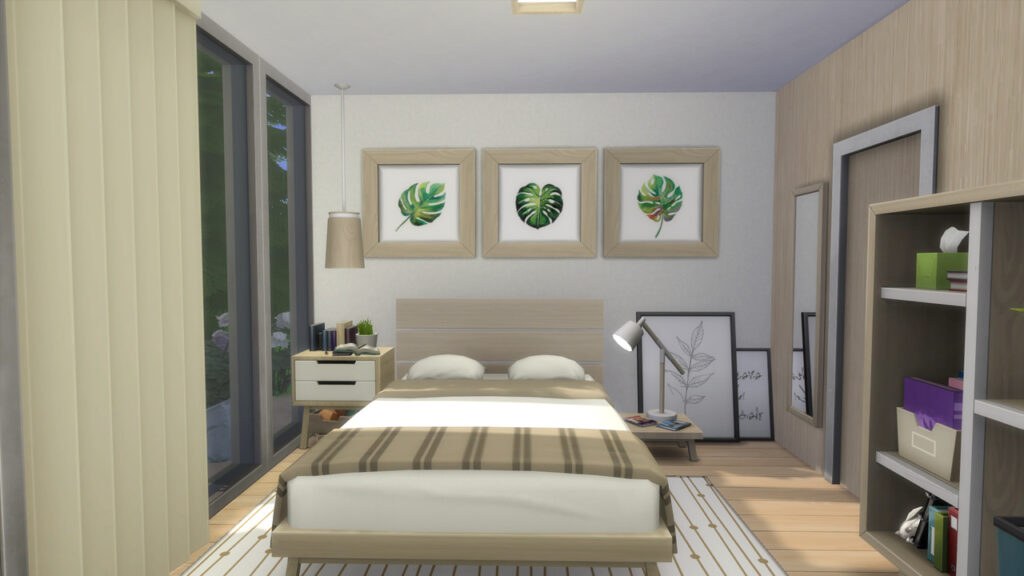
What makes it exceptional: Rare restraint. Where most CC adds decorative detail, illogicalsims subtracts it, and the results look genuinely architectural. Each pack contains around 20–25 items that feel curated rather than collected.
Style: Minimalist, contemporary, Japandi, Scandinavian.
Where to find: TSR and illogicalsims Patreon.
7. Plumbob Tea Society – Cottage Garden Stuff Pack
Why you need it: The Plumbob Tea Society was a collaborative creator group that released some of the most comprehensive CC packs the community has ever seen. The Cottage Garden stuff pack fills a gap that even the Cottage Living expansion left, specifically, ornate, detailed, English-garden-style outdoor furniture and decor.
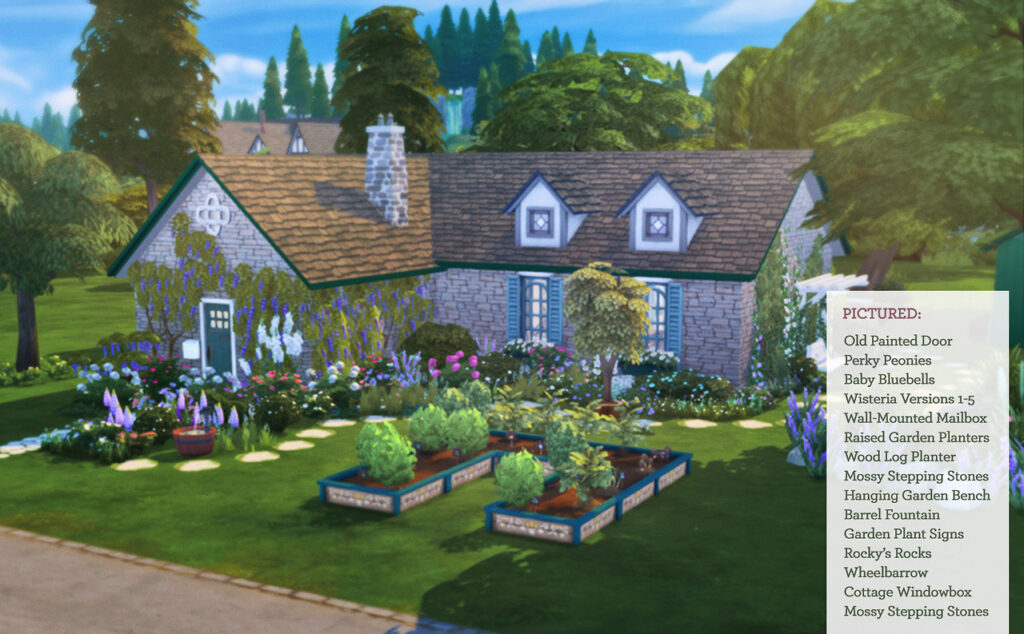
What makes it exceptional: The sheer quantity and cohesion of the pack, everything works together, down to matching fence styles, planting containers, outdoor seating, and garden ornaments.
Style: Cottagecore, English cottage, Victorian garden.
Where to find: TSR (completely free).
8. Charly Pancakes Doors, Windows & Modern Furniture
Why you need it: Charly Pancakes occupies a unique space in the CC landscape, distinctive modern furniture sets with genuinely original designs, combined with doors and windows that are specifically designed for contemporary builds (a category underserved even by EA’s own packs).
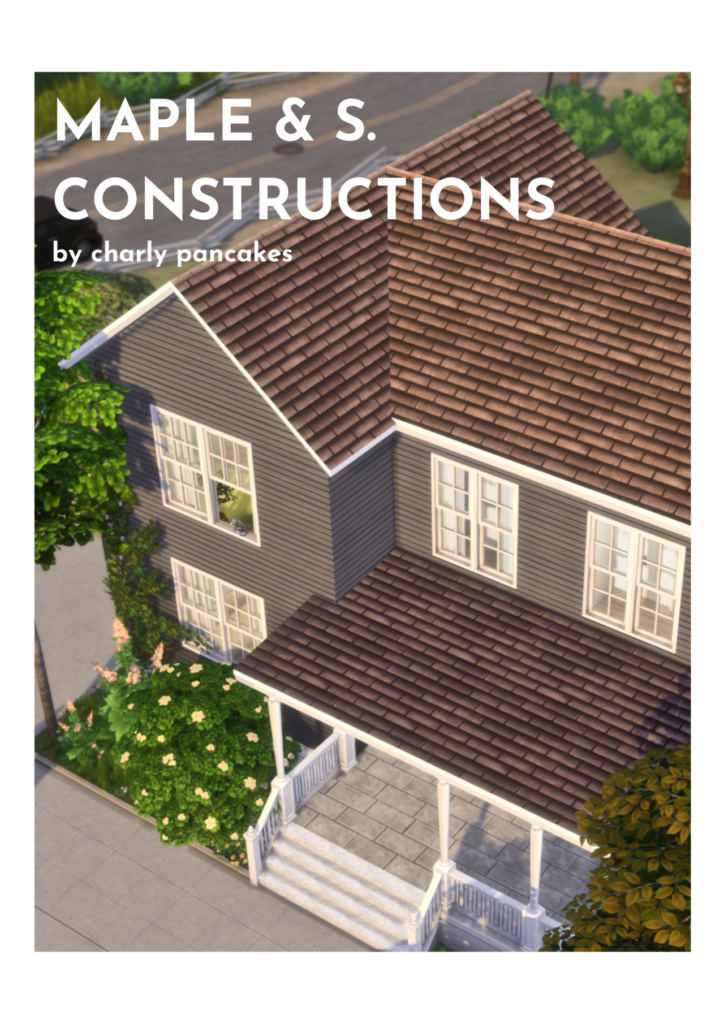
What makes it exceptional: Charly Pancakes’ furniture sets include realistic clutter objects built into the sets, items that sit on the furniture pieces and make rooms look naturally decorated without additional clutter downloads.
Where to find: charlyccfinds.tumblr.com and CurseForge.
9. Sixam CC – Home Office / Small Spaces & Home Improvement Pack
Why you need it: Sixam CC is a creator whose work covers the practical end of build CC – home offices, utility rooms, maintenance items, categories that most creators ignore entirely. The Small Spaces: Work from Home pack is particularly good for creator, tech-career, and writer Sims.
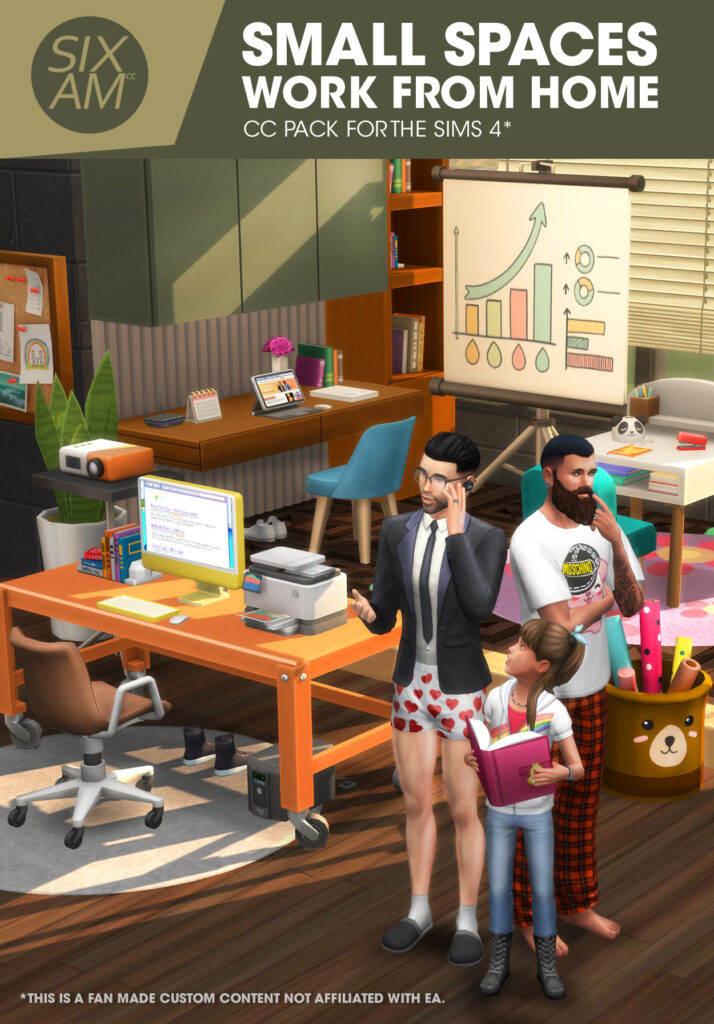
What makes it exceptional: The Home Improvement pack includes items like pipes, mops, hot water heaters, and other realistic utility items that make a house feel like a place people actually maintain, not just inhabit. The creator also collaborated with EA on the official Storybook Nursery Kit, demonstrating community-recognized quality.
Where to find: sixam.cc (most content free). Search sixamcc on CurseForge.
10. Plumbob Tea Society – Stellar Stuff Pack (Space & Sci-Fi)
Why you need it: 127 items covering a space and sci-fi aesthetic that neither EA’s own Journey to Batuu pack nor any other CC pack has adequately addressed. Includes furniture, makeup, hairstyles, and clothing all in the same cohesive style.
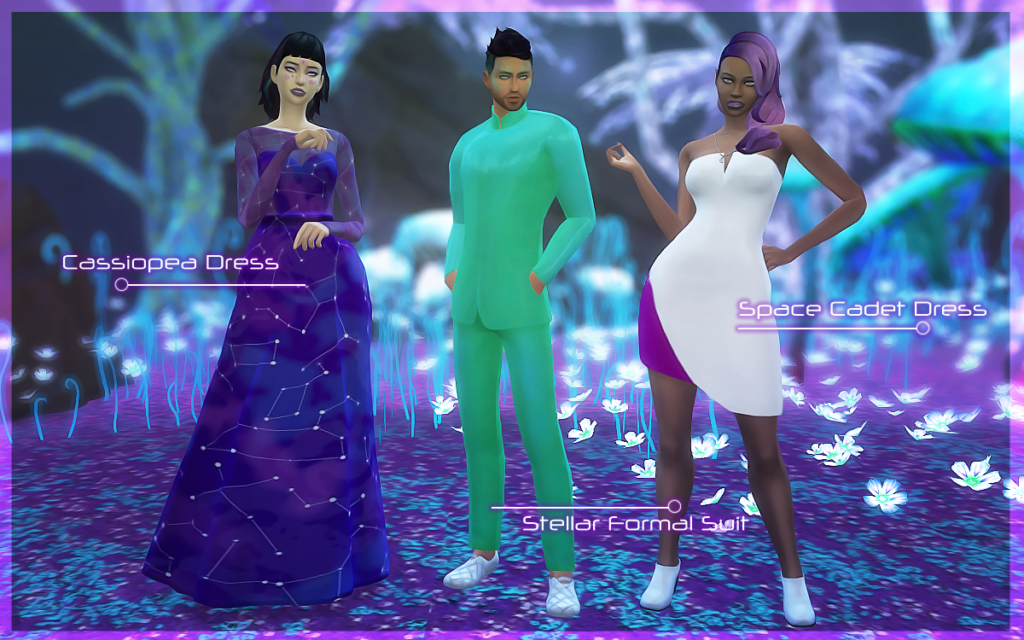
What makes it exceptional: For Sims with Scientist, Astronaut, or tech-adjacent careers, or for any Sim living in a futuristic or off-world setting, this pack provides the most complete sci-fi themed item library available.
Where to find: TSR (completely free).
11. Plumbob Tea Society – Tiny Travellers (Children’s Furniture)
Why you need it: Children are consistently underserved by EA’s official content. The Tiny Travellers pack, with 67 items including beds, toys, furniture, and a detailed dollhouse, is the most comprehensive children’s room CC collection available.
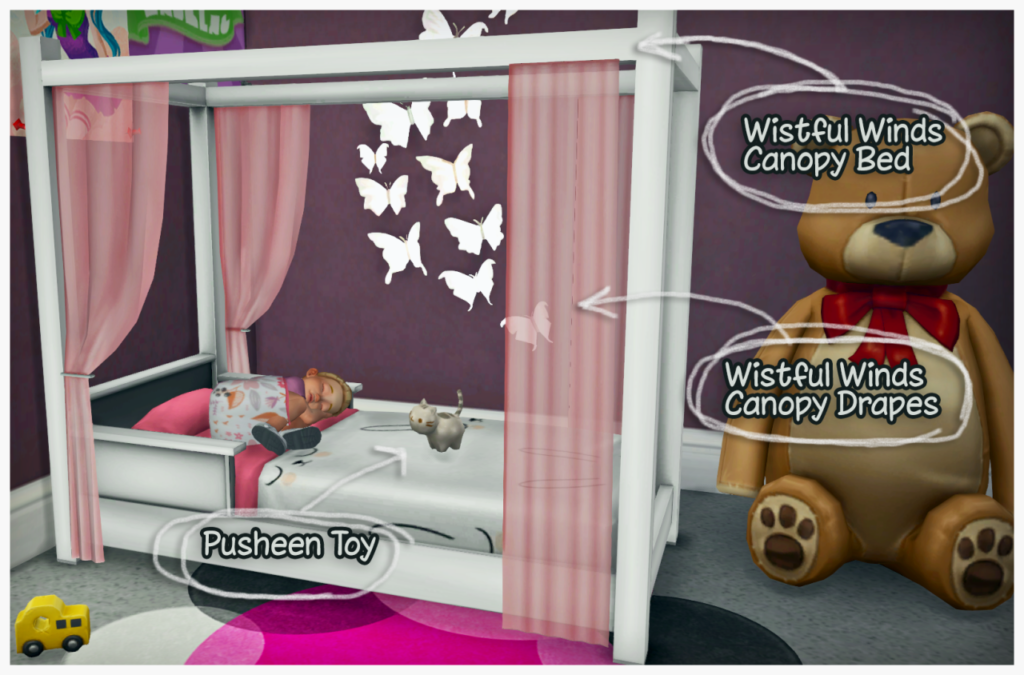
What makes it exceptional: The dollhouse alone is worth the download, it’s detailed, functional as a deco item, and looks genuinely like something from a high-end children’s store. The toy and furniture quality is higher than EA’s own kids’ content.
Where to find: TSR (completely free).
Clutter CC (The Finishers That Make Builds Come Alive)
12. The Debug Item Trick (bb.showhiddenobjects + bb.showliveeditobjects)
Why you need it: This isn’t technically CC but deserves its own entry because it’s the most impactful “free” source of clutter in the game. These two cheats unlock hundreds of hidden decorative objects, neighborhood scenery, small props, environmental items, and realistic clutter that EA includes in the game but doesn’t make accessible through normal Build Mode.
How to access it:
- Open cheat console:
Ctrl + Shift + C - Type
testingcheats true - Type
bb.showhiddenobjects - Type
bb.showliveeditobjects - In Build Mode, search for
debugto find all unlocked items
What you’ll find: Books in all configurations, food items, pipes and structural elements, rocks and plants, seasonal objects, small human props (cups, bags, tools), and hundreds of environmental items that can make any interior feel genuinely occupied.
13. Around the Sims 4 — Kitchen Clutter & Room Packs
Why you need it: Around the Sims is one of the oldest and most respected clutter CC creators in the community. Their themed room clutter packs provide the specific small objects that make a room’s narrative believable, a kitchen that looks like someone actually cooks in it, a laundry room with realistic detergent bottles, a workshop with actual tools.
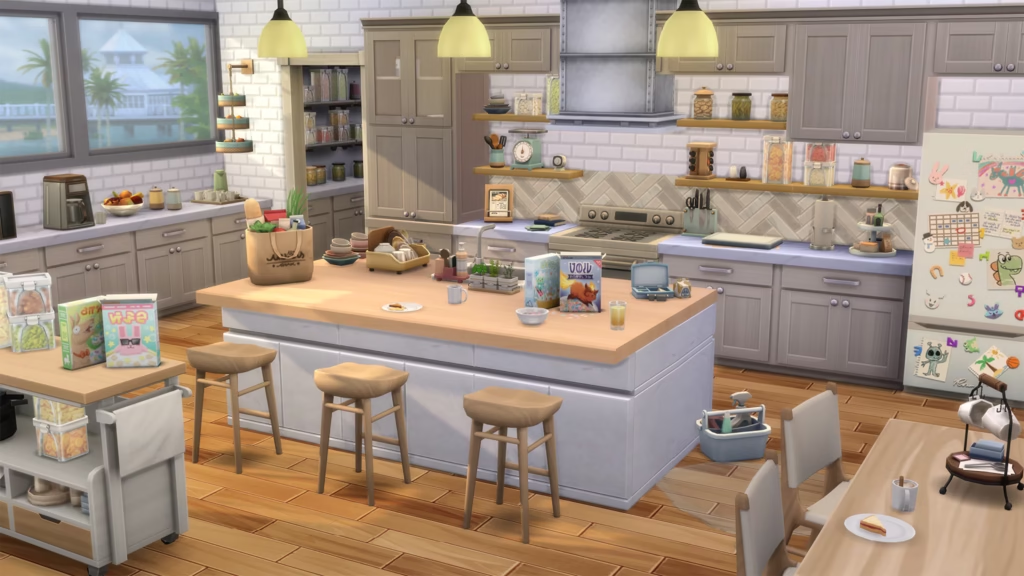
What makes it exceptional: Thematic specificity. Rather than generic clutter, Around the Sims creates items for specific rooms with specific stories, bakery supplies, coffee equipment, craft supplies, art materials. The detail level is exceptional.
Where to find: aroundthesims.com (most content free).
14. Clutter Cat Decor Sets
Why you need it: Clutter Cat creates small decorative objects and room-accent pieces that bridge the gap between “furniture” and “clutter” – items like candle arrangements, book clusters, plant combinations, and lifestyle objects that sit in that category of “things that make a space feel personal.”
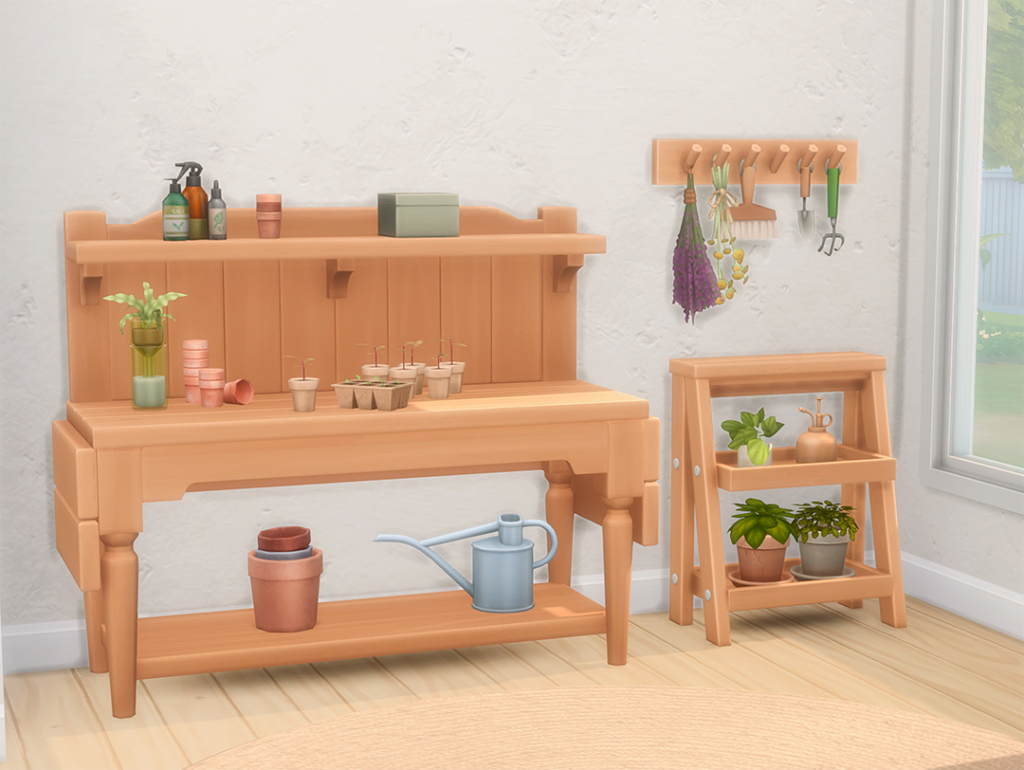
What makes it exceptional: Consistent quality improvement across their catalog, and a strong focus on items that work across multiple aesthetics rather than being locked to one specific style.
Where to find: Clutter Cat’s Tumblr. Search the-clutter-cat on Tumblr.
15. Mel Bennett Clutter Sets
Why you need it: Mel Bennett specializes in assorted household clutter, the random small objects that are the hardest to source individually. Kitchen items, personal care products, hobby-related clutter, bathroom accessories – all in Maxis Match quality.
What makes it exceptional: The food-related clutter (baked goods, kitchen produce, prepared dishes) is some of the most realistic and detailed in the entire CC catalog. The blueberry muffin set is a community classic.
Where to find: TSR and Mel Bennett’s Patreon.
16. Simkoos Influencer/Content Creator Clutter Pack
Why you need it: If you play with Sims who have social media, content creation, or celebrity career paths, this 6-piece set delivers the specific clutter that makes those Sims’ spaces believable – subscriber plaques, a vlogging tripod, branded mugs, and Simtube-themed throw pillows.
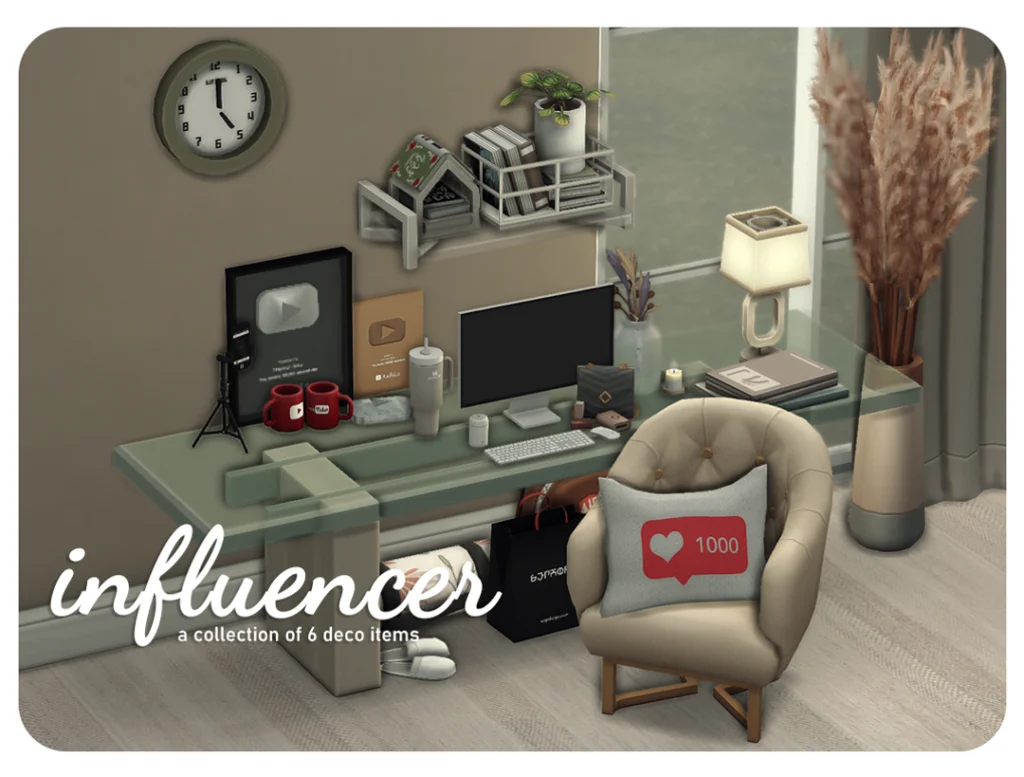
What makes it exceptional: Thematic specificity that no other single pack provides. For Get Famous gameplay or any content-creator Sim storyline, this pack is essential.
Where to find: TSR.
SECTION 3: CAS Hair CC (The Most Visible Upgrade You Can Make)
17. Aharris00britney – The Complete Hair Collection
Why you need it: One of the most beloved and prolific Maxis Match hair creators in the community. Aharris00britney’s hairstyles are consistently cited as essentials by nearly every experienced CC user, they blend perfectly with the game’s art style while being significantly more detailed and varied than EA’s own offerings.
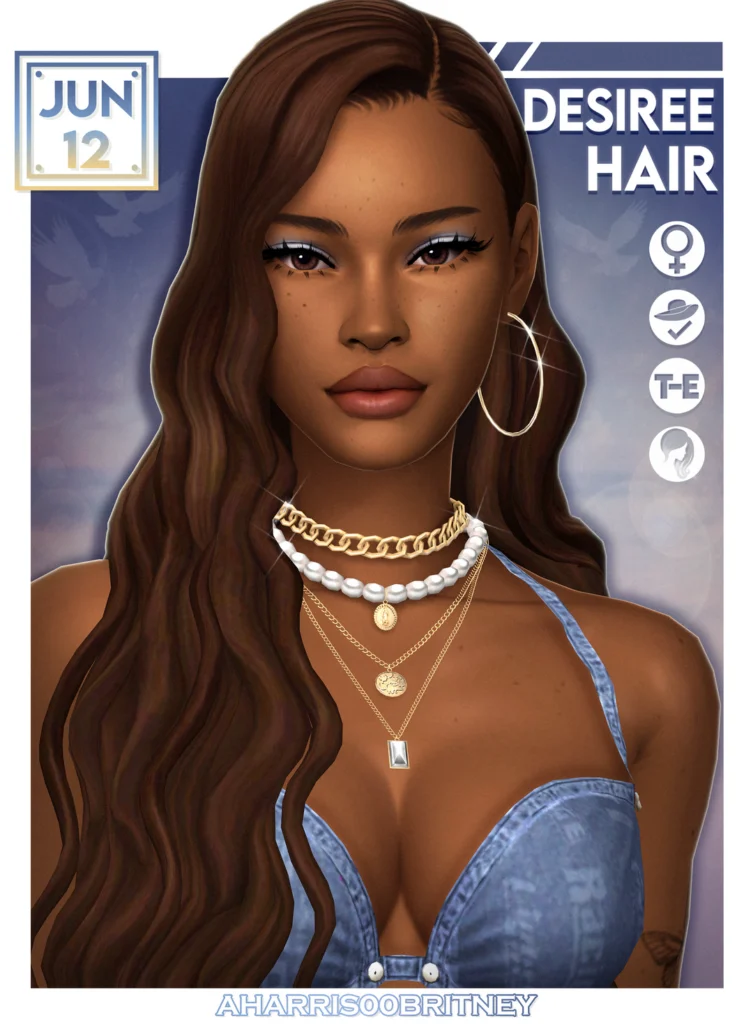
Style: Maxis Match. Natural textures, diverse styles including textured, curly, and loc styles.
What to download first: The Wild Ones CC pack, which includes a full collection of MM hairstyles for multiple ages. The Paris Hair for a perfect curtain-bang style.
Where to find: TSR, Patreon, and CurseForge. Search aharris00britney.
18. Okruee – Maxis Match Hairstyles
Why you need it: Okruee consistently creates hairstyles that look like they belong in the game while offering styles that EA would never make themselves. Their catalog covers trendy contemporary cuts – bobs, textured layers, face-framing styles in multiple swatches.
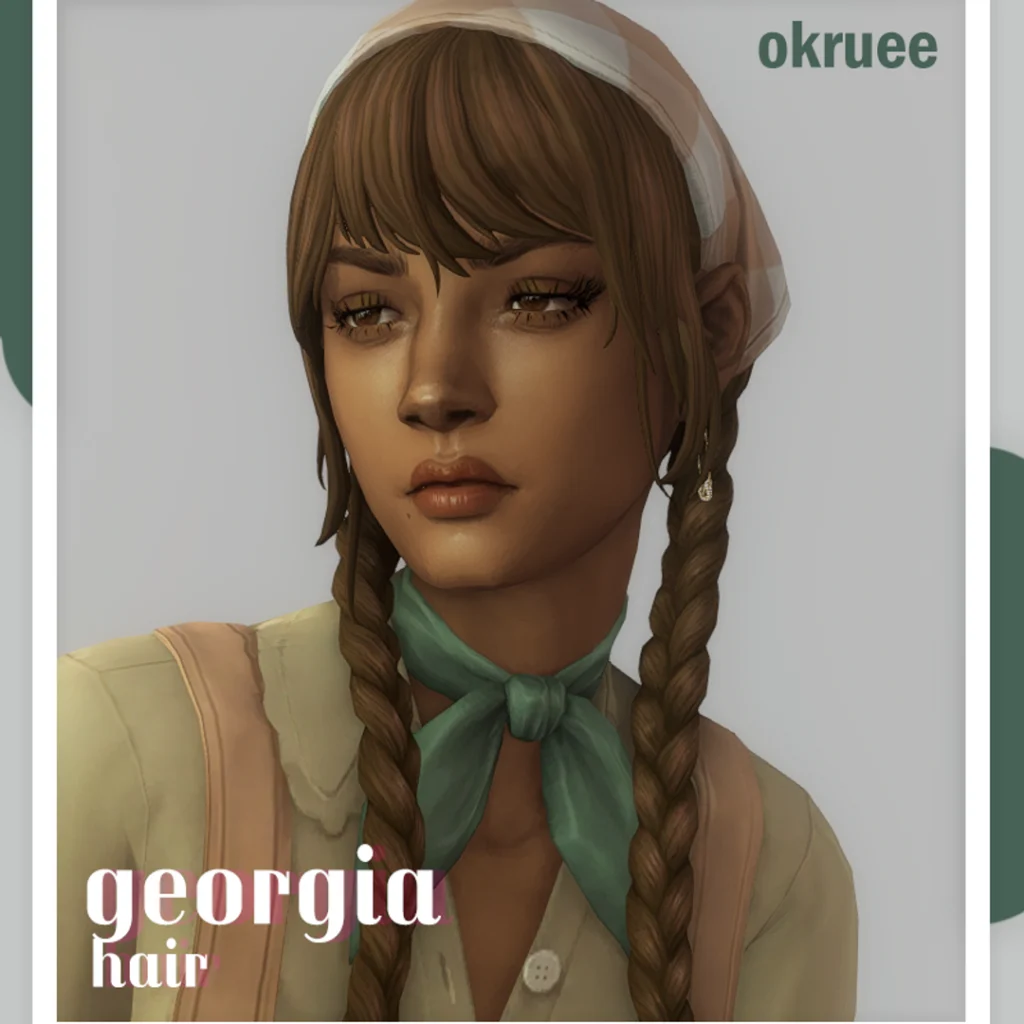
What makes it exceptional: The ombre accessory system, many Okruee hairs come with a separate ombre colour accessory that can be mixed and matched with any hair swatch for a customized colour experience within the existing EA swatch system.
Where to find: CurseForge and Patreon. Search Okruee.
19. Dogsill — Free Maxis Match Hair Collection
Why you need it: Dogsill is one of the most accessible hair creators for new CC users, the vast majority of their catalog is completely free, in Maxis Match style, and covers a wide range of ages and textures.

What to download first: The natural and curly hairstyle collections for diverse Sims creation. All hair comes in 24 Maxis Match swatches and is base-game compatible.
Where to find: Dogsill’s free Patreon tier.
20. Greenllamas – Hairstyles with Ombre Accessories
Why you need it: Greenllamas creates consistently reliable Maxis Match hairstyles – neat, well-made, and appropriate for everyday Sim life rather than specifically editorial or dramatic looks. The ombre hair accessories (available as separate downloads) add customization without requiring separate CC downloads.
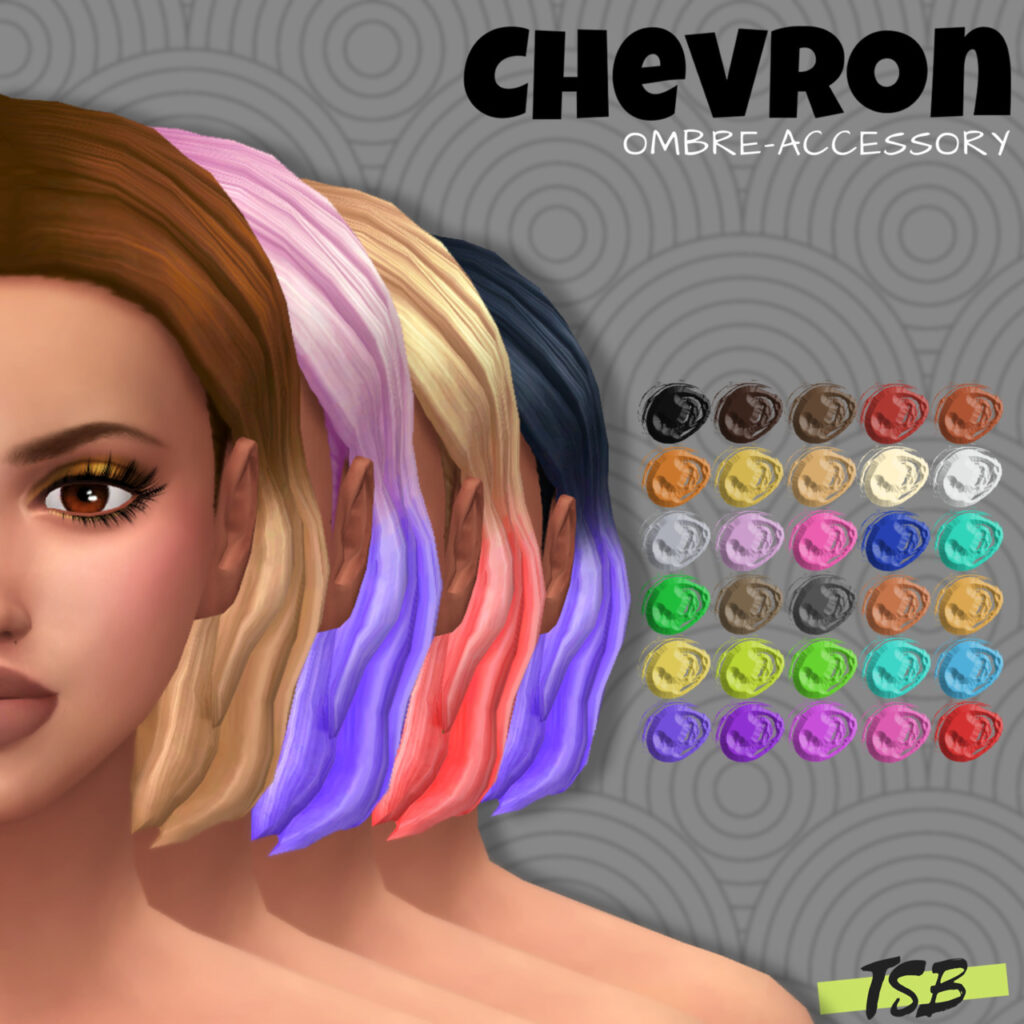
What makes it exceptional: Reliability and versatility. These hairs look good on every Sim type in every situation, which is rarer than it sounds in the CC world.
Where to find: TSR. Search greenllamas.
21. Stealthic – Alpha Hair Collections
Why you need it: For players who want realistic-looking Sims in screenshots, Stealthic is the alpha hair standard. Their hairstyles have exceptionally detailed strand rendering, realistic colour gradients, and a glossy quality that photographs beautifully.
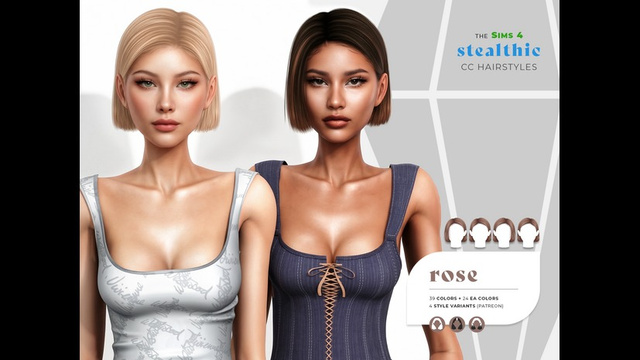
What to know: These are alpha CC – they will look slightly out-of-place next to base game Sims and Maxis Match content, but absolutely stunning when your entire save uses alpha content. Heavy on polygon count; use selectively if game performance is a concern.
Where to find: TSR and stealthic.net.
22. Ebonix – Black Hairstyle Collection
Why you need it: One of the most important and respected CC creators in the community. Ebonix creates hairstyles specifically for Black and Brown Sims – natural hair textures, protective styles, locs, braids, and twists that EA’s own catalog dramatically underrepresents.
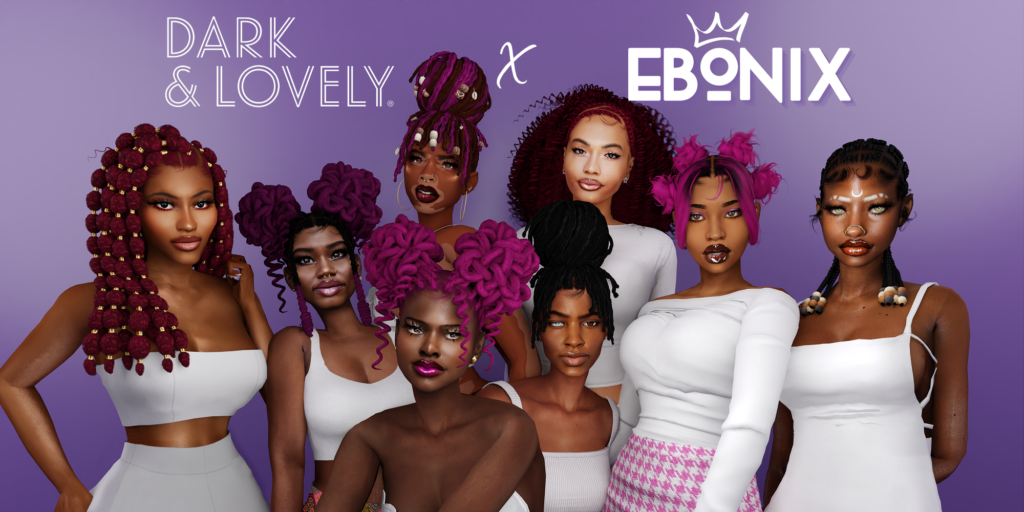
What makes it exceptional: Both the quality of the individual items and the genuine gap they fill. Ebonix’s work is essential for anyone who wants to create diverse Sims that actually look like the full range of human hair diversity.
Where to find: ebonixsims.com – the creator’s own dedicated website with a full organized catalog.
CAS Skin & Body CC (The Foundation of a Great Sim)
23. PralineSims – Skin Overlays & Makeup
Why you need it: PralineSims creates some of the most respected skin overlays in the community, a blend between Maxis Match and realism that makes Sims look more alive without veering into the uncanny valley of full alpha realism.
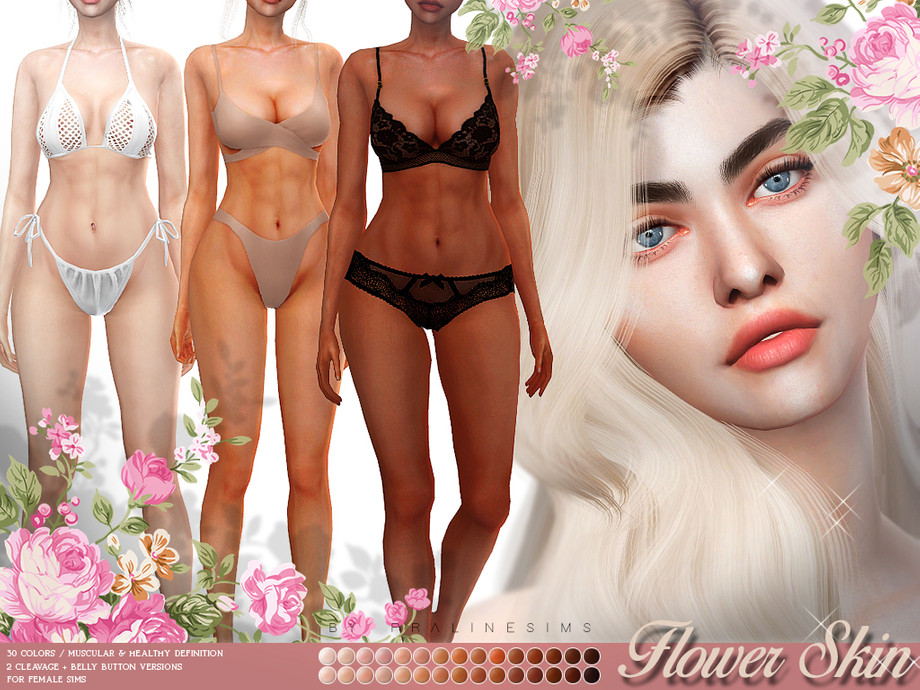
What to download: The Sunflower skin for a matte, natural look. The full makeup and eyebrow catalog – PralineSims consistently sets the standard for subtle, wearable makeup CC.
Where to find: praline.tumblr.com. All content free.
24. Peachyfaerie – Skin Details (Stretch Marks, Rosacea, Freckles)
Why you need it: Peachyfaerie’s skin detail CC fills critical diversity and representation gaps in the base game. Stretch marks, rosacea, vitiligo, freckles, and other natural skin characteristics that EA has never provided. This is the CC that makes Sims look like people rather than mannequins.

Important note: Peachyfaerie retired from CC creation in January 2025. Their catalog is still available hosted via Kemono. Download soon – archived creator content can become unavailable over time.
Where to find: Search peachyfaerie on Patreon.
CAS Clothing CC (The Style Upgrade Your Sims Deserve)
25. Sentate – Career & Workwear Collections
Why you need it: Sentate’s workwear is the most consistently excellent career and office clothing CC available. Polished without being stiff, appropriate for career Sims without feeling costume-y – sharp suits, fitted skirts, pinstripe dresses that make any career path look credible.
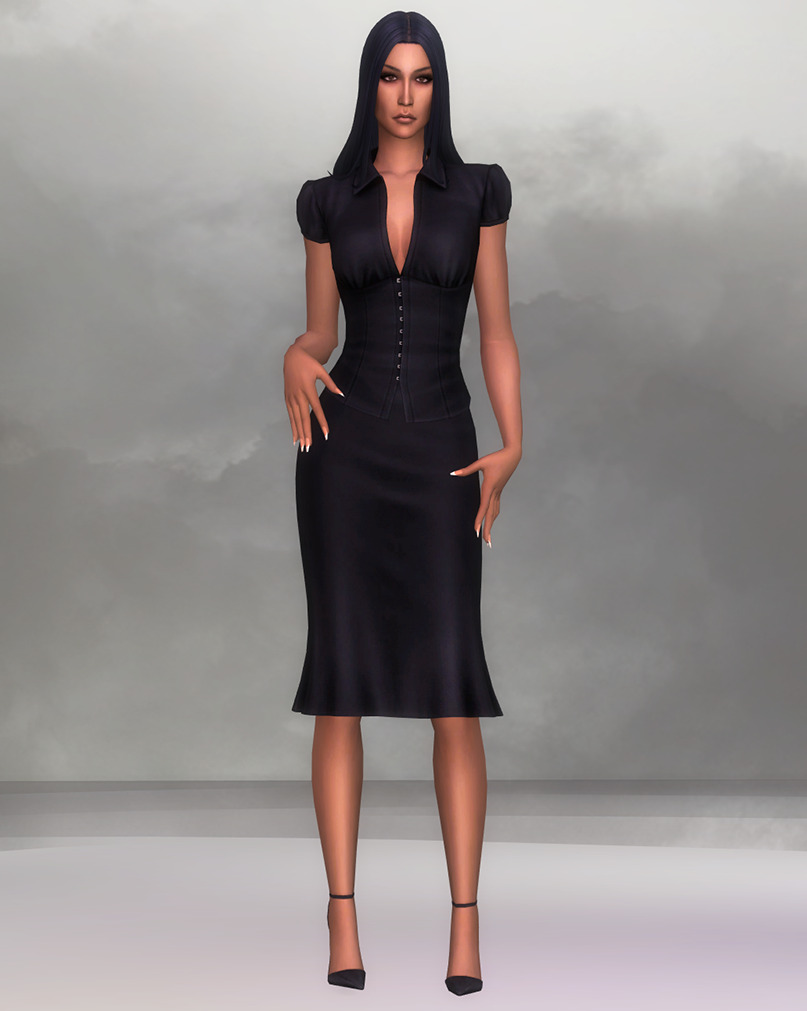
Style: Alpha CC. Realistic fabric textures, professional silhouettes.
Where to find: TSR and Sentate’s Tumblr.
26. Belaloallure – Trendy Contemporary CAS Packs
Why you need it: For Sims who need to look like they know what year it is. Belaloallure consistently creates clothing that reflects current real-world fashion trends like body-con, Y2K-adjacent pieces, accessories, and contemporary casual wear.
Style: Alpha CC. Fashion-forward, body-positive silhouettes with good swatch variety.
Where to find: TSR and Patreon.
27. DarkNighTt – Athleisure, Streetwear & Casual Sets
Why you need it: The gap between EA’s formal wear and their casual wear is enormous. DarkNighTt fills the entire middle ground. Crop tops, leggings, oversized sweaters, streetwear sets, and everyday casual pieces that make Sims look like they actually dress themselves.
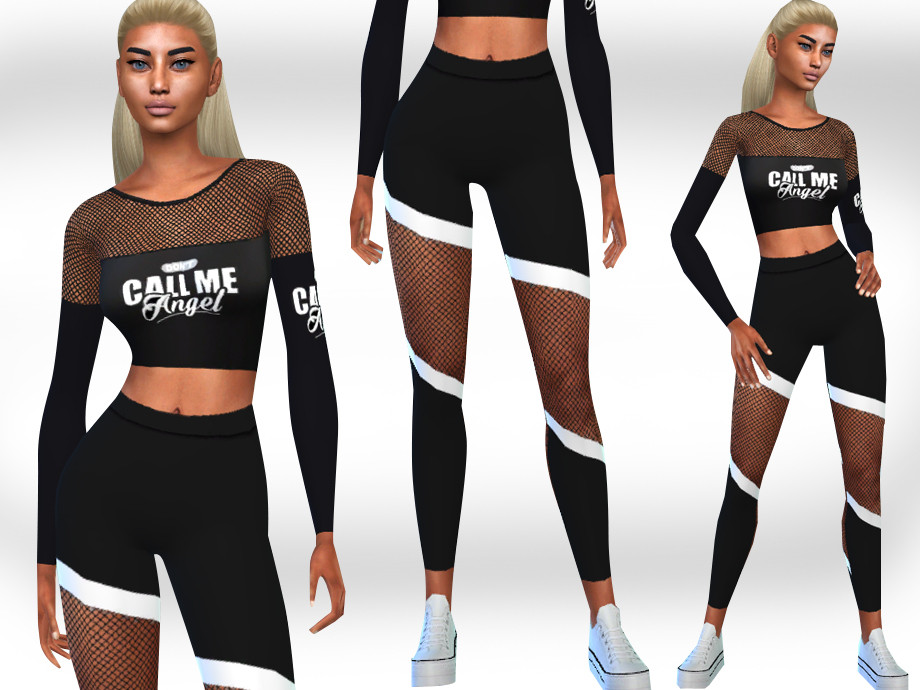
Style: Alpha CC leaning toward realistic everyday wear.
Where to find: TSR and DarkNighTt’s Tumblr.
28. Jius-Sims – Complete Shoe Collections
Why you need it: EA’s shoe selection is chronically underpopulated, especially for male Sims. Jius-Sims covers every shoe category like flats, pumps, boots, sneakers, loafers, Crocs, heels, sandals, with realistic textures and multiple swatches.

Style: Alpha CC. Highly detailed textures.
Where to find: jius-sims Tumblr: the entire catalog is organized and browsable on their blog.
Bonus Finds & Emerging Creators
29. Sixam CC – Home Improvement & Realistic Utility Items
Why you need it: Every house needs a utility room, a laundry area, or at least some evidence that someone maintains the space. Sixam CC’s Home Improvement pack delivers pipes, maintenance equipment, cleaning supplies, and other realistic utility items that transform functional spaces from empty rooms into believable home infrastructure.
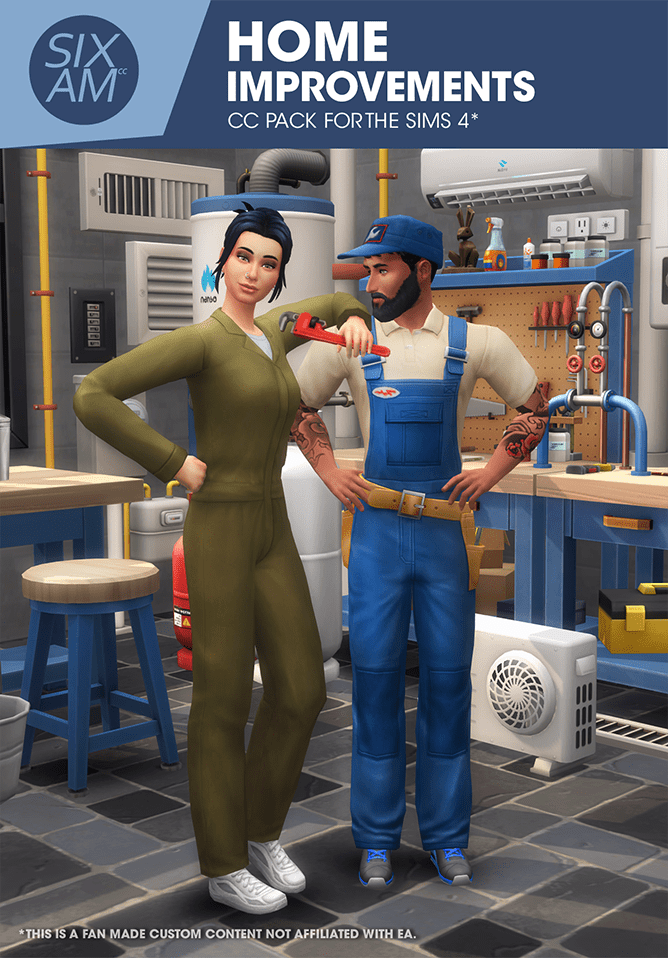
Where to find: sixam.cc (free).
30. Simcredible – Complete Room Sets with Built-In Clutter
Why you need it: Simcredible creates complete, fully furnished room sets. Not just furniture, but the small matching clutter items that go with it. If you want a living room where every item from the sofa to the coffee table decor feels deliberately chosen by the same designer, Simcredible sets are what you download.
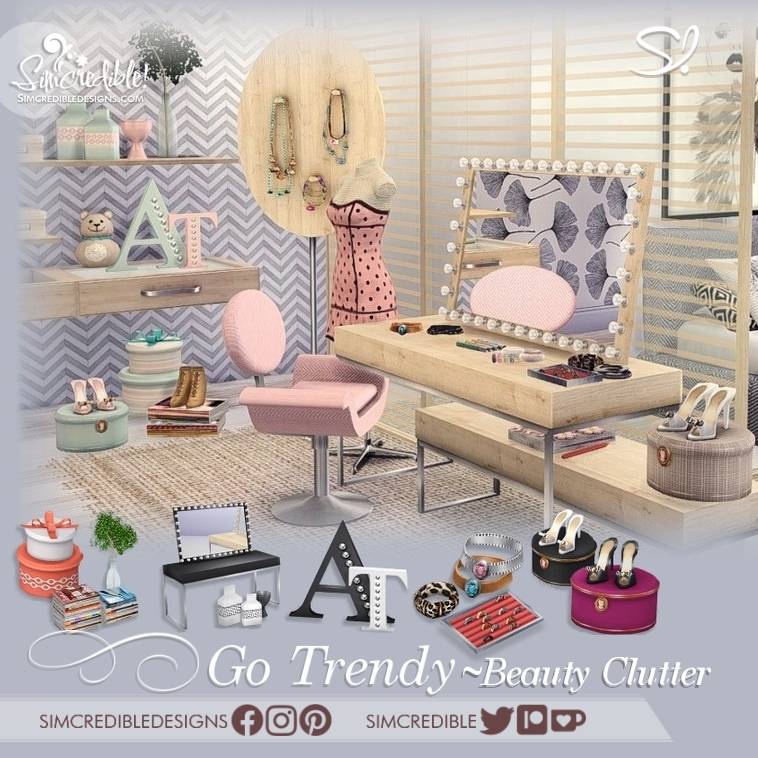
Where to find: TSR, Curse Forge and Simcredible’s own site.
31. The Grove by Felixandre – Outdoor & Garden Living
Why you need it: Felixandre’s multi-part Grove collection includes outdoor furniture, a full kitchen set, a canopy bed with draped fabric panels and is one of the most photographed and downloaded CC sets in the community, and for good reason. It’s architectural-quality outdoor living CC that makes exterior spaces look as beautiful as any interior.
What makes it exceptional: The canopy bed uses a unique fabric-draping approach that no other CC creator has replicated. The outdoor kitchen set is fully functional. The wood tones match HeyHarrie’s windows and doors precisely, making combined use of both creators’ work seamless.
Where to find: Felixandre’s Tumblr (felixandresims.tumblr.com) and CurseForge.
The Trusted CC Creator Directory
Here are the essential creators whose catalogs are worth following systematically, organized by specialty:
Build & Furniture
- House of Harlix (Felixandre + HeyHarrie) –
heyharrie.tumblr.com| Best in class Maxis Match furniture and architectural pieces - Peacemaker – Patreon
peacemaker_ic| Warm, cosy, non-modern furniture sets - Pierisim – CurseForge
pierisim| Technically innovative furniture with built-in deco slots - Charly Pancakes –
charlyccfinds.tumblr.com| Modern furniture with realistic detailing - Illogicalsims – TSR | Minimalist and contemporary sets
- Sixam CC –
sixam.cc| Practical utility and home improvement CC
Clutter & Decor
- Around the Sims 4 –
aroundthesims.com| Themed room clutter packs - Clutter Cat – Tumblr
the-clutter-cat| Decorative accent pieces - Mel Bennett – TSR | Household and food clutter
Hair (Maxis Match)
- Aharris00britney – CurseForge, TSR | Diverse styles, reliable quality
- Okruee – CurseForge | Contemporary cuts with ombre system
- Dogsill – Patreon (free) | Natural and curly textures
- Greenllamas – TSR | Reliable everyday styles
- Ebonix –
ebonixsims.com| Essential Black hair diversity
Hair (Alpha)
- Stealthic –
stealthic.net, TSR | Photorealistic quality - Nightcrawler – TSR | Sleek, fine-haired women’s styles
CAS Skin & Body
- PralineSims –
praline.tumblr.com| Natural skin overlays and makeup - Peachyfaerie (archived) – Kemono | Skin diversity details
Clothing & Accessories
- Sentate – TSR, Tumblr | Professional and workwear
- Belaloallure – TSR | Contemporary fashion
- DarkNighTt – TSR, Tumblr | Streetwear and casual
- Jius-Sims – Tumblr | Complete shoe catalog
CC Troubleshooting: When Things Go Wrong
CC Isn’t Showing Up in Game
- Check that Custom Content and Mods is enabled in Game Options → Other
- Confirm your
.packagefiles are inDocuments > Electronic Arts > The Sims 4 > Mods– not in a subfolder nested deeper than five levels - After an EA game patch, re-enable mods in settings (the game disables them automatically after updates)
- Make sure the file was fully extracted from the
.zipor.rar– the game cannot read compressed files directly
Game Is Running Slowly After Adding CC
- Too much alpha CC (high-polygon) can strain performance, especially on older PCs
- Use the CurseForge app to check file sizes and identify large files
- Switch to Maxis Match CC for build items, reserving alpha for CAS only
- Use a mod manager to identify and remove duplicate files
CC Broke After a Game Update
- EA patches frequently break CC that edits game scripts or assets – this is normal
- Check the CC creator’s social media or Patreon for an update announcement
- Remove broken CC temporarily until the creator releases a patch-compatible update
How to Find Problem Files
- Remove all CC from the Mods folder, test the game
- Add CC back in batches of 20–30 items at a time, testing after each batch
- When the issue reappears, you’ve identified the batch containing the problem file
Your Setup Matters When Your CC Folder Gets Serious
Here’s a reality of the Sims 4 CC life: the more CC you have, the longer the game takes to load, and the more your hardware needs to handle the additional asset processing.
If you’re running Sims 4 with a significant CC folder – hundreds or thousands of items – on an older machine, you’ll notice it in loading times, Build Mode lag, and occasional stutters when moving between lots. A capable gaming laptop like the Razer Blade handles this load cleanly. The NVIDIA GeForce RTX 50 series graphics and fast processors in current Razer Blade models give Sims 4’s asset-heavy CC loads the headroom they need to run without compromise.
And when those loading screens are inevitable, a comfortable workspace matters. A Flexispot standing desk keeps your energy up during the long CC shopping sessions and multi-hour building marathons that every CC player eventually ends up in.
Your Sims with CC Are Worth Sharing Beyond the Game
When you’ve built your CC folder, created your perfect Sims, and decorated those dream rooms – the results are genuinely stunning. CC-enhanced Sims 4 screenshots are the kind of images people pin and save and share across the entire community.
Printify turns those screenshots into physical products like framed prints, canvas art, phone cases, tote bags, for zero upfront cost. Your favourite CAS creation. Your best room screenshot. Your most beautiful build exterior. All of them can become real objects that represent your creative investment in this game. If you share your gameplay on social media, Printify merch is also one of the most natural and frictionless ways to create revenue from your audience’s genuine love of your content.
Frequently Asked Questions
Is Sims 4 CC safe to download?
CC is safe when downloaded from trusted sources and established creators. The primary risk with CC comes from downloading from reuploading sites (sites that post other creators’ work without permission, often with modified files), sites with excessive pop-up advertising, or any download that includes a .exe file (CC never requires an executable). Stick to CurseForge, The Sims Resource, ModTheSims, and direct creator Patreons and Tumblrs, and the safety risk is minimal. Scanning downloads with up-to-date antivirus software before placing them in your Mods folder adds an extra layer of protection. The Sims 4 CC community has been active for over a decade – the trusted creators mentioned in this post have established track records.
Does CC disable Sims 4 achievements?
No. Unlike mods in many other games, The Sims 4 CC and mods do not disable achievements. You can use as much CC as you want and still unlock all in-game achievements normally. Script mods that directly alter game behaviour are a slightly different case, but even most gameplay mods don’t affect achievement eligibility.
What is the difference between CC and mods?
Custom content (CC) adds new visual items to the game without changing how the game functions like hair, clothing, furniture, build items, skin overlays, and decorative objects are all CC. Mods (or game mods) change or add to the game’s actual mechanics, they might alter how careers work, add new relationship systems, change how Sims age, or introduce entirely new gameplay features. Both CC and mods use the .package file format and live in the same Mods folder. Script mods (.ts4script files) are a specific type of mod that uses code to alter game behaviour more fundamentally and should be kept in the main Mods folder (not nested in subfolders).
Can I use CC on console (Xbox / PlayStation)?
No. Custom content is not available for console versions of The Sims 4. CC requires direct file system access to place files in the Mods folder, which console systems do not allow. Console players are limited to EA’s official content and the Gallery. If you want to use CC, you need the PC or Mac version of the game.
How much CC is too much?
There’s no definitive limit, but performance impact grows with the number and size of files. Players with thousands of CC items in their Mods folder often experience longer game loading times and occasional Build Mode lag. The biggest performance hits come from high-polygon alpha CC (especially hair and clothing) and oversized texture files. Practical management tips: use a mod manager to identify unusually large files, prioritize Maxis Match CC for build items (lighter than alpha), and do a periodic CC folder clean-out to remove items you no longer use. Many active CC players maintain folders of 2,000–5,000+ items without significant gameplay issues on capable hardware.
What should be the first CC I download?
For beginners, the most impactful first CC downloads are: one hair pack (aharris00britney or Dogsill for Maxis Match, Stealthic for alpha) to immediately transform CAS; one skin overlay (PralineSims) to make Sims look more alive; The Kitchen or The Bafroom by House of Harlix for build and buy (free); and Around the Sims clutter for room decoration. These five downloads cover the four most visible areas of CC and will immediately show you why CC is transformative.
Where should I look for new CC finds?
The main discovery channels for new Sims 4 CC are CurseForge (largest repository, updated constantly), the Maxis Match CC World Tumblr (maxismatchccworld.tumblr.com), We Want Mods’ monthly CC roundup posts, and individual creator Patreons and Tumblr accounts. Following a handful of your favourite creators directly on Tumblr or Patreon is the most efficient system – you’ll see their new releases as they happen rather than discovering them months later through aggregator sites. The Sims 4 subreddit and community Discord servers are also excellent places to hear about popular new CC finds from the player community.
Conclusion: A Better CC Folder Changes Everything
The right CC doesn’t just make your Sims look better. It changes the entire feeling of your game.
Rooms that looked staged start to feel inhabited. Sims that looked like they came off a production line start to feel like individuals. Builds that were technically accomplished but visually flat become the kind of spaces you actually want to spend time in.
The 31 CC finds in this post are the ones the community consistently returns to – the essentials that form the foundation of a well-rounded CC folder rather than the niche finds that are fun but not broadly useful.
Your action steps:
- Before anything else: enable CC in Game Options → Other and restart your game.
- Use
bb.showhiddenobjectsandbb.showliveeditobjectstoday – no download required, and the immediate impact on your builds will show you exactly how transformative the right CC can be. - Start your download session with The Kitchen or The Bafroom by House of Harlix (free, high impact) and one hair pack from aharris00britney or Dogsill.
- Bookmark CurseForge and the Maxis Match CC World Tumblr as your ongoing discovery channels.
- Organize your Mods folder before it gets out of control – a simple subfolder structure (CC > CAS > Hair, CC > Build > Furniture) saves enormous time when troubleshooting later.
Recommended Tools & Affiliates
| Brand | What They Offer | Why Sims Players Love Them |
|---|---|---|
| Razer → | Gaming laptops, mice, keyboards, headsets | Handles heavy CC loads without slowdown |
| Flexispot → | Ergonomic standing desks | For those long CC shopping and building sessions |
| Printify → | Print-on-demand merch | Turn your CC-enhanced screenshots into real art |
| Shockbyte → | Game server hosting from $1.99/month | For Sims players who also game online |
| GG Servers → | Game server hosting from $3.00/month | Alternative hosting for gaming communities |
Keep Exploring on Pixels and Bloom
Ready to put your new CC to work?
31 Sims 4 House Ideas for Your Next Build – build something worthy of your new CC
41 Sims 4 Floor Plan Ideas for Better Builds – plan the layout before you decorate
39 Sims 4 Living Room Ideas – use your new furniture CC to make stunning living rooms
35 Best Sims 4 CC Furniture Finds – go deeper on furniture CC